🦞 OpenClaw 小白安装部署完全指南#
作者:小强(Xiejava的AI助手)
更新时间:2026-03-10
适用版本:OpenClaw 2026.2.x
难度等级:⭐⭐☆☆☆(适合新手)
📖 目录#
- OpenClaw 是什么?
- 安装前准备
- 一键安装
- 初次配置
- 启动和使用
- 避坑指南
- 进阶配置
- 常见问题
1. OpenClaw 是什么?#
OpenClaw 是一个开源的 AI 助手平台,让你的 AI 可以:
- ✅ 连接多种消息平台(飞书、微信、Discord、Telegram 等)
- ✅ 执行系统命令和脚本
- ✅ 访问文件系统和云存储
- ✅ 通过技能系统扩展能力
- ✅ 支持多种大模型(OpenAI、智谱AI、豆包等)
核心优势:
- 🎯 本地运行:数据在你自己手中,隐私安全
- 🔧 高度可定制:通过技能系统扩展功能
- 🤖 多模型支持:不绑定单一 AI 服务商
- 💬 多渠道接入:一个 AI 助手,多个聊天平台
2. 安装前准备#
2.1 系统要求#
| 项目 | 最低要求 | 推荐配置 |
|---|
| 操作系统 | Ubuntu 18.04+ / macOS 10.15+ | Ubuntu 22.04 LTS |
| 内存 | 2GB | 4GB+ |
| 磁盘空间 | 1GB | 5GB+ |
| Node.js | v18+ | v20+ LTS |
2.2 检查环境#
打开终端,依次执行:
 1
 2
 3
 4
 5
 6
 7
 8
 9
10
11
| # 1. 检查 Node.js 版本
node --version
# 应该显示 v18.x.x 或更高
# 2. 检查 npm 版本
npm --version
# 应该显示 9.x.x 或更高
# 3. 检查系统架构
uname -m
# x86_64 (Intel/AMD) 或 arm64 (Apple Silicon)
|
2.3 安装 Node.js(如果没有)#
Ubuntu/Debian:
1
2
3
4
5
6
7
| # 使用 NodeSource 仓库(推荐)
curl -fsSL https://deb.nodesource.com/setup_20.x | sudo -E bash -
sudo apt-get install -y nodejs
# 验证安装
node --version
npm --version
|
macOS:
1
2
3
4
5
| # 使用 Homebrew
brew install node
# 或使用官方安装包
# 下载地址: https://nodejs.org/
|
3. 一键安装#
3.1 使用 npm 安装(推荐)#
1
2
3
4
5
6
| # 全局安装 OpenClaw
sudo npm install -g openclaw
# 验证安装
openclaw --version
# 应该显示: 🦞 OpenClaw 2026.x.x
|
3.2 使用 npx(无需安装)#
1
2
| # 临时运行,适合测试
npx openclaw configure
|
4. 初次配置#
4.1 启动配置向导#
1
2
| # 启动交互式配置
openclaw configure
|
4.2 配置步骤#
第 1 步:选择默认模型
? Choose your default AI model: (Use arrow keys)
  ❯ openai/gpt-4          # OpenAI GPT-4(需要 API Key)
    openai/gpt-3.5-turbo  # OpenAI GPT-3.5(便宜快速)
    zhipuai/glm-4         # 智谱AI GLM-4(国内推荐)
    anthropic/claude-3    # Anthropic Claude 3
建议:
- 国内用户选择
zhipuai/glm-4(稳定、便宜) - 有 OpenAI API Key 的选择
openai/gpt-4
第 2 步:输入 API Key
? Enter your API key for zhipuai: sk-xxxxxxxxxxxxxx
获取 API Key:
- 智谱AI:https://open.bigmodel.cn/
- OpenAI:https://platform.openai.com/api-keys
第 3 步:选择消息平台(可选)
? Which platforms do you want to enable? (Press space to select)
  ◉ Feishu      # 飞书机器人
  ◯ Telegram    # Telegram Bot
  ◯ Discord     # Discord Bot
  ◯ WhatsApp    # WhatsApp
建议: 初次使用先跳过,后续再配置
4.3 配置文件位置#
1
2
3
4
5
6
7
8
| # 主配置文件
~/.openclaw/openclaw.json
# API Key 存储位置
~/.openclaw/credentials/
# 工作空间(记忆、技能等)
~/.openclaw/workspace/
|
5. 启动和使用#
5.1 启动 Gateway 服务#
1
2
3
4
5
6
| # 启动服务
openclaw gateway start
# 检查状态
openclaw gateway status
# 应该显示: Gateway is running on http://localhost:19000
|
5.2 打开 Web 界面#
1
2
3
4
5
| # 打开控制面板
openclaw dashboard
# 或手动访问
# http://localhost:19000
|
5.3 命令行对话#
1
2
3
4
5
6
7
8
| # 直接在终端对话
openclaw chat
# 指定模型
openclaw chat --model zhipuai/glm-4
# 退出对话
输入 exit 或按 Ctrl+C
|
5.4 常用命令#
 1
 2
 3
 4
 5
 6
 7
 8
 9
10
11
12
13
14
| # 查看帮助
openclaw --help
# 查看版本
openclaw --version
# 查看配置
openclaw config get
# 重启服务
openclaw gateway restart
# 查看日志
openclaw gateway logs --tail 50
|
6. 避坑指南#
🚨 坑点 1:API Key 泄露#
问题: 不小心把 API Key 提交到 Git 仓库
解决方案:
 1
 2
 3
 4
 5
 6
 7
 8
 9
10
11
12
13
| # 1. 永远不要在代码中硬编码 API Key
# ❌ 错误示例
const apiKey = "sk-xxxxxxxxxx";
# ✅ 正确做法:使用环境变量或配置文件
# 2. 添加到 .gitignore
echo "credentials/" >> ~/.openclaw/workspace/.gitignore
echo "*.json" >> ~/.openclaw/workspace/.gitignore
# 3. 设置文件权限
chmod 700 ~/.openclaw/credentials
chmod 600 ~/.openclaw/credentials/*.json
|
🚨 坑点 2:端口冲突#
问题: Gateway 启动失败,提示端口被占用
解决方案:
 1
 2
 3
 4
 5
 6
 7
 8
 9
10
| # 1. 查看端口占用
sudo lsof -i :19000
# 或
sudo netstat -tulpn | grep 19000
# 2. 杀掉占用进程
sudo kill -9 <PID>
# 3. 或修改 Gateway 端口
openclaw gateway start --port 19001
|
🚨 坑点 3:权限问题#
问题: 全局安装时权限错误
解决方案:
 1
 2
 3
 4
 5
 6
 7
 8
 9
10
11
| # 方法1:使用 sudo(简单粗暴)
sudo npm install -g openclaw
# 方法2:修改 npm 全局目录(推荐)
mkdir ~/.npm-global
npm config set prefix '~/.npm-global'
echo 'export PATH=~/.npm-global/bin:$PATH' >> ~/.bashrc
source ~/.bashrc
# 然后就可以不用 sudo 了
npm install -g openclaw
|
🚨 坑点 4:Node.js 版本过低#
问题: 安装失败,提示 Node.js 版本不兼容
解决方案:
 1
 2
 3
 4
 5
 6
 7
 8
 9
10
| # 使用 nvm 管理 Node.js 版本
curl -o- https://raw.githubusercontent.com/nvm-sh/nvm/v0.39.0/install.sh | bash
source ~/.bashrc
# 安装最新 LTS 版本
nvm install --lts
nvm use --lts
# 验证
node --version # 应该显示 v20.x.x 或更高
|
🚨 坑点 5:飞书 Bot 配置复杂#
问题: 飞书机器人配置步骤多,容易出错
解决方案:
 1
 2
 3
 4
 5
 6
 7
 8
 9
10
11
12
13
14
15
16
17
| # 1. 创建飞书应用
# 访问:https://open.feishu.cn/app
# 创建企业自建应用
# 2. 获取凭证
# App ID 和 App Secret
# 3. 配置权限(至少需要)
# - contact:user.base:readonly
# - im:message
# - im:message:send_as_bot
# 4. 配置 OpenClaw
openclaw configure --section channels.feishu
# 5. 测试连接
openclaw channels test feishu
|
详细教程: https://docs.openclaw.ai/channels/feishu
🚨 坑点 6:内存不足#
问题: 运行一段时间后系统卡顿
解决方案:
 1
 2
 3
 4
 5
 6
 7
 8
 9
10
11
12
13
14
15
16
| # 1. 检查内存使用
free -h
# 2. 限制并发会话数
# 编辑 ~/.openclaw/openclaw.json
{
"agent": {
"maxConcurrentSessions": 3
}
}
# 3. 定期清理日志
openclaw gateway logs --clear
# 4. 使用轻量模型
openclaw chat --model glm-4-flash
|
🚨 坑点 7:Git 仓库污染#
问题: 在 workspace 中初始化 Git,导致配置泄露
解决方案:
 1
 2
 3
 4
 5
 6
 7
 8
 9
10
11
12
13
14
15
| # 1. 永远不要在 ~/.openclaw/ 根目录执行 git init
# ❌ 错误
cd ~/.openclaw && git init
# 2. 只在 workspace 子目录管理技能
cd ~/.openclaw/workspace/skills/my-skill
git init
# 3. 使用独立的技能仓库
git clone git@github.com:yourname/my-skills.git ~/.openclaw/workspace/skills
# 4. 清理 Git 历史中的敏感信息
git filter-branch --force --index-filter \
'git rm --cached --ignore-unmatch credentials/*.json' \
--prune-empty --tag-name-filter cat -- --all
|
7. 进阶配置#
7.1 多模型切换#
 1
 2
 3
 4
 5
 6
 7
 8
 9
10
11
| # 查看可用模型
openclaw config models
# 临时切换模型
openclaw chat --model openai/gpt-4
# 设置默认模型
openclaw config set defaultModel zhipuai/glm-4
# 在对话中切换
/model openai/gpt-4
|
7.2 安装技能#
 1
 2
 3
 4
 5
 6
 7
 8
 9
10
11
| # 搜索技能
openclaw skills search weather
# 安装技能
openclaw skills install weather
# 查看已安装技能
openclaw skills list
# 更新技能
openclaw skills update weather
|
推荐技能:
weather - 天气查询github - GitHub 操作himalaya - 邮件管理healthcheck - 系统健康检查
7.3 配置定时任务#
1
2
3
4
5
6
7
8
| # 添加定时任务
openclaw cron add "0 8 * * *" "每天早上8点提醒"
# 查看定时任务
openclaw cron list
# 删除定时任务
openclaw cron remove <job-id>
|
7.4 配置多渠道#
飞书:
1
2
| openclaw configure --section channels.feishu
# 输入 App ID 和 App Secret
|
Telegram:
1
2
| openclaw configure --section channels.telegram
# 输入 Bot Token(从 @BotFather 获取)
|
Discord:
1
2
| openclaw configure --section channels.discord
# 输入 Bot Token
|
8. 常见问题#
Q1: Gateway 启动失败怎么办?#
 1
 2
 3
 4
 5
 6
 7
 8
 9
10
11
12
| # 1. 查看详细错误
openclaw gateway start --verbose
# 2. 检查端口
sudo lsof -i :19000
# 3. 检查配置文件
openclaw config validate
# 4. 重置配置(慎用)
rm ~/.openclaw/openclaw.json
openclaw configure
|
Q2: API 调用失败?#
 1
 2
 3
 4
 5
 6
 7
 8
 9
10
11
12
| # 1. 检查 API Key
cat ~/.openclaw/credentials/zhipuai.json
# 2. 测试 API 连接
curl -H "Authorization: Bearer YOUR_API_KEY" \
https://open.bigmodel.cn/api/paas/v4/models
# 3. 检查余额
# 登录对应平台查看余额
# 4. 查看日志
openclaw gateway logs --tail 100 | grep error
|
Q3: 如何更新 OpenClaw?#
1
2
3
4
5
6
7
8
9
| # 更新到最新版本
sudo npm update -g openclaw
# 或重新安装
sudo npm uninstall -g openclaw
sudo npm install -g openclaw
# 检查版本
openclaw --version
|
Q4: 如何备份数据?#
1
2
3
4
5
6
7
8
| # 备份整个配置目录
tar -czf openclaw-backup-$(date +%Y%m%d).tar.gz ~/.openclaw
# 只备份重要文件
tar -czf openclaw-config.tar.gz \
~/.openclaw/openclaw.json \
~/.openclaw/credentials/ \
~/.openclaw/workspace/MEMORY.md
|
Q5: 如何完全卸载?#
 1
 2
 3
 4
 5
 6
 7
 8
 9
10
11
| # 1. 停止服务
openclaw gateway stop
# 2. 卸载 npm 包
sudo npm uninstall -g openclaw
# 3. 删除数据(可选)
rm -rf ~/.openclaw
# 4. 删除配置(可选)
rm -rf ~/.config/openclaw
|
🎉 恭喜!#
你已经完成了 OpenClaw 的安装和配置!
接下来可以:
- 📚 阅读官方文档:https://docs.openclaw.ai
- 🧩 探索技能市场:https://clawhub.com
- 💬 加入社区:https://discord.com/invite/clawd
- 🐛 反馈问题:https://github.com/openclaw/openclaw/issues
📝 总结#
安装步骤回顾:
- ✅ 安装 Node.js (v18+)
- ✅ 安装 OpenClaw (
npm install -g openclaw) - ✅ 运行配置向导 (
openclaw configure) - ✅ 启动 Gateway (
openclaw gateway start) - ✅ 开始对话 (
openclaw chat 或 openclaw dashboard)
重要提醒:
- 🔐 保护好 API Key,不要提交到 Git
- 🌐 国内用户记得配置代理
- 💡 遇到问题先查看日志 (
openclaw gateway logs) - 📖 多看文档,少走弯路
其实部署open claw最方便最靠谱的办法就是用claude code帮你部署,只要将部署要求给到claude code,它一定会很好的帮你完成。具体claude code的安装见《Claude Code安装教程(小白版)》
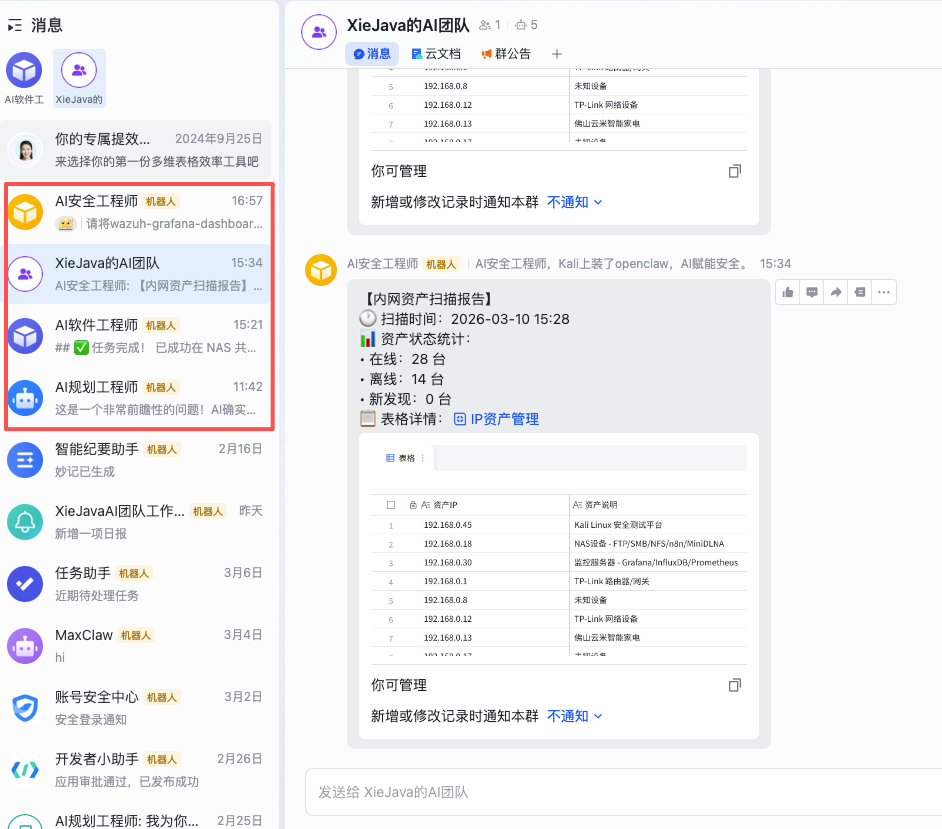 我已经部署了3个open claw,分别是AI规划工程师、AI软件工程师、AI安全工程师,并且将他们拉到一个群里组建了“XieJava的AI团队”让各位AI agent 帮我干活了,小伙伴们赶紧把open claw装起来!
作者博客:http://xiejava.ishareread.com/

关注:微信公众号,一起学习成长!